

XML sitemaps are essential for ensuring your website’s pages get noticed by search engines. Without them, important pages like product listings or campaign content can remain undiscovered, leading to reduced visibility and missed opportunities.
Here’s why XML sitemaps matter:
- They act as a roadmap, helping search engines find and index critical pages.
- The
<lastmod>tag signals content updates, prompting faster re-crawling. - They improve crawl efficiency, ensuring search engines prioritize valuable pages.
- Common issues like orphan pages or wasted crawl budgets are minimized.
Key benefits include:
- Faster indexing for new or updated pages.
- Consistent visibility for high-priority content.
- Fewer technical errors, like broken links or outdated URLs.
The Visibility Problem: What Happens Without XML Sitemaps
Crawl and Indexation Limitations
XML sitemaps play a critical role in guiding search engines to your website’s pages. Without them, several visibility challenges emerge. Search engines rely on links to discover and index pages, but many websites contain deeply buried pages – often referred to as orphan pages – that lack internal links. These pages might include product launch announcements, campaign hubs, or brand storytelling content. Without proper guidance, crawlers often overlook such pages, wasting valuable crawl budget on duplicate or low-priority content. The result? Reduced search visibility for important pages.
How Poor Crawl Coverage Hurts Search Visibility
When crawlers fail to reach key pages, those pages simply don’t rank. Imagine launching a new product or creating a seasonal campaign hub – if these pages aren’t indexed, they won’t appear in search results, no matter how well-written or visually appealing they are. While the <lastmod> tag in XML sitemaps signals content updates to search engines, the absence of a sitemap leaves crawlers without clear direction. This can lead to outdated content lingering in search results and missed opportunities for fresh content to gain traction. Such technical gaps can directly impact your brand’s bottom line.
"A stale sitemap is almost as bad as no sitemap. If you add new pages but never update your sitemap, Google won’t know those pages exist." – Analyze AI [7]
Business Consequences of Weak Technical SEO
An audit conducted by Capconvert over 24 months (concluding in 2026) reviewed 47 e-commerce websites and uncovered a striking issue: nearly 30% of these sites lacked an XML sitemap. Alarmingly, this included three businesses generating over $10 million in gross merchandise value (GMV) [3]. The absence of sitemaps meant search engines couldn’t locate deeper pages, leading to lost organic visibility. For brands, this creates a ripple effect – delayed content discovery, wasted crawl budget, and an inconsistent brand message. And the worst part? These issues are completely avoidable with the right technical SEO practices.
sbb-itb-aebd855
XML Sitemaps: What They Are, Why They Matter, How To Create & Submit One.
How XML Sitemaps Fix These Problems
The indexing issues mentioned earlier all stem from a common problem: search engines often lack a clear roadmap of your site. An XML sitemap acts as that roadmap, guiding search engines to the most important pages. Let’s dive into what an XML sitemap does and how it helps solve these problems.
What Is an XML Sitemap?
An XML sitemap is essentially a detailed list of your site’s key pages, supplemented with optional metadata for added context. Instead of relying solely on internal links, this file gives search engines a direct and structured way to find critical pages. It helps address challenges like orphan pages or inefficient crawl budgets by ensuring that every important page gets the attention it deserves. This not only boosts SEO but also enhances the overall experience for users visiting brand websites.
How Sitemaps Work with Search Engines
When you submit your sitemap via tools like Google Search Console or Bing Webmaster Tools, you’re essentially giving search engines a heads-up about your site’s structure. This submission also unlocks helpful reports on indexing status, crawl errors, and processed URLs. Adding a reference to your sitemap in the robots.txt file provides an additional discovery route for all crawlers. This includes AI-based crawlers like OpenAI’s GPTBot and Anthropic’s ClaudeBot, which, as of 2026, also depend on sitemaps to efficiently index content [2].
This process improves crawl coverage, speeds up indexing, and ensures search engines prioritize the pages that matter most. But sitemaps don’t stop at just providing a list of URLs – they use metadata to add even more context.
Using Metadata Tags to Signal Page Importance
XML sitemaps don’t just list URLs – they also include metadata tags that give search engines additional information about each page. Here’s a breakdown of the four standard tags and how search engines handle them in 2026:
| Tag | Required? | What It Does | 2026 Search Engine Support |
|---|---|---|---|
<loc> |
Yes | Specifies the full, absolute canonical URL | Mandatory – always used [1][9] |
<lastmod> |
No | Indicates when a page was last meaningfully updated | High – actively used by Google and Bing [3][8] |
<changefreq> |
No | Suggests how often content changes | Low – largely ignored [1][8] |
<priority> |
No | Indicates relative importance (0.0 to 1.0) | Low – largely ignored [1][3] |
Among these tags, the <lastmod> tag stands out for its usefulness. Google, for example, actively uses this tag when it accurately reflects changes to a page. As Google Search Central explains:
"Google uses the
<lastmod>value if it’s consistently and verifiably (for example by comparing to the last modification of the page) accurate." [8]
To make the most of the <lastmod> tag, only update it when a page has undergone meaningful changes. For example, if you’ve refreshed a product page or updated a campaign hub, that’s the right time to update the <lastmod> value. Avoid arbitrary updates, as they can mislead search engines and reduce the tag’s effectiveness.
Key Benefits of XML Sitemap Integration for Brand Websites
Now that we’ve explored how sitemaps function, let’s dive into the practical advantages they bring to brand websites.
Better Crawl Coverage and Faster Indexing
Without a sitemap, search engines rely solely on your website’s internal links to discover pages. This can leave certain pages – like newly launched ones, deeply buried pages, or those rendered with JavaScript – overlooked by search engines. Adding a sitemap ensures these pages are found and indexed faster.
Nicola Hughes, an SEO Specialist at TAL Agency, explains:
"An XML sitemap removes that discovery problem. It gives Google a direct list of every page you consider important, which supports faster indexation [and] helps ensure deep pages are not missed." [5]
Consistent Search Presence for High-Value Pages
Sitemaps do more than speed up indexing – they help maintain visibility for your most critical pages. Whether it’s product descriptions, campaign landing pages, or your brand story, these pages often carry the weight of your site’s performance. By keeping the sitemap updated, you can ensure these key pages remain prominent in search results.
For example, when you update a product description or refresh a campaign page, the <lastmod> tag in your sitemap signals Google to revisit and recrawl that content sooner. This keeps your most relevant pages fresh in search rankings.
A real-world case: In May 2026, a mid-size e-commerce store with 250,000 URLs revamped its sitemap strategy. They split one massive sitemap into seven smaller, segmented files – covering products, categories, and brands – while removing 120,000 outdated or unnecessary URLs. The result? Their indexed URL ratio soared from 38% to 81% within six weeks, and their organic traffic grew 22% year-over-year. [2]
Sitemaps not only enhance visibility but also help tidy up your site’s structure.
Cleaner Site Architecture and Fewer Technical Errors
A well-constructed sitemap not only improves indexing but also helps uncover technical issues that could hurt your SEO. Below is a table outlining common errors sitemaps can reveal and how to address them:
| Common Error | Cause | Fix |
|---|---|---|
| 404 Not Found | Deleted page or changed URL slug | Remove from sitemap; set up a 301 redirect [6] |
| 301/302 Redirect | Non-canonical URL | Replace with the final destination URL [6] |
| Noindex Conflict | noindex page included in sitemap |
Remove from sitemap to avoid mixed signals [6] |
| Robots.txt Block | Disallowed URL listed in sitemap | Remove the disallow rule or exclude the URL [6] |
Hardik Shah, Founder of ScaleGrowth.Digital, emphasizes the importance of keeping sitemaps clean:
"A sitemap isn’t a set-it-and-forget-it file. It’s a live document that tells Google what you consider important on your site. Every URL in your sitemap is a crawl request. If you’re sending Google to 404 pages, redirect chains, or noindexed content, you’re wasting crawl budget and signaling that your site isn’t well-maintained." [4]
For larger websites, segmenting sitemaps by content type – such as sitemap-products.xml and sitemap-blog.xml – can help pinpoint where errors are concentrated. A healthy site typically achieves an indexed URL rate of 85% to 95%. If your rate falls below 70%, it’s a clear signal to investigate potential structural issues. [4]
How to Integrate an XML Sitemap Step by Step
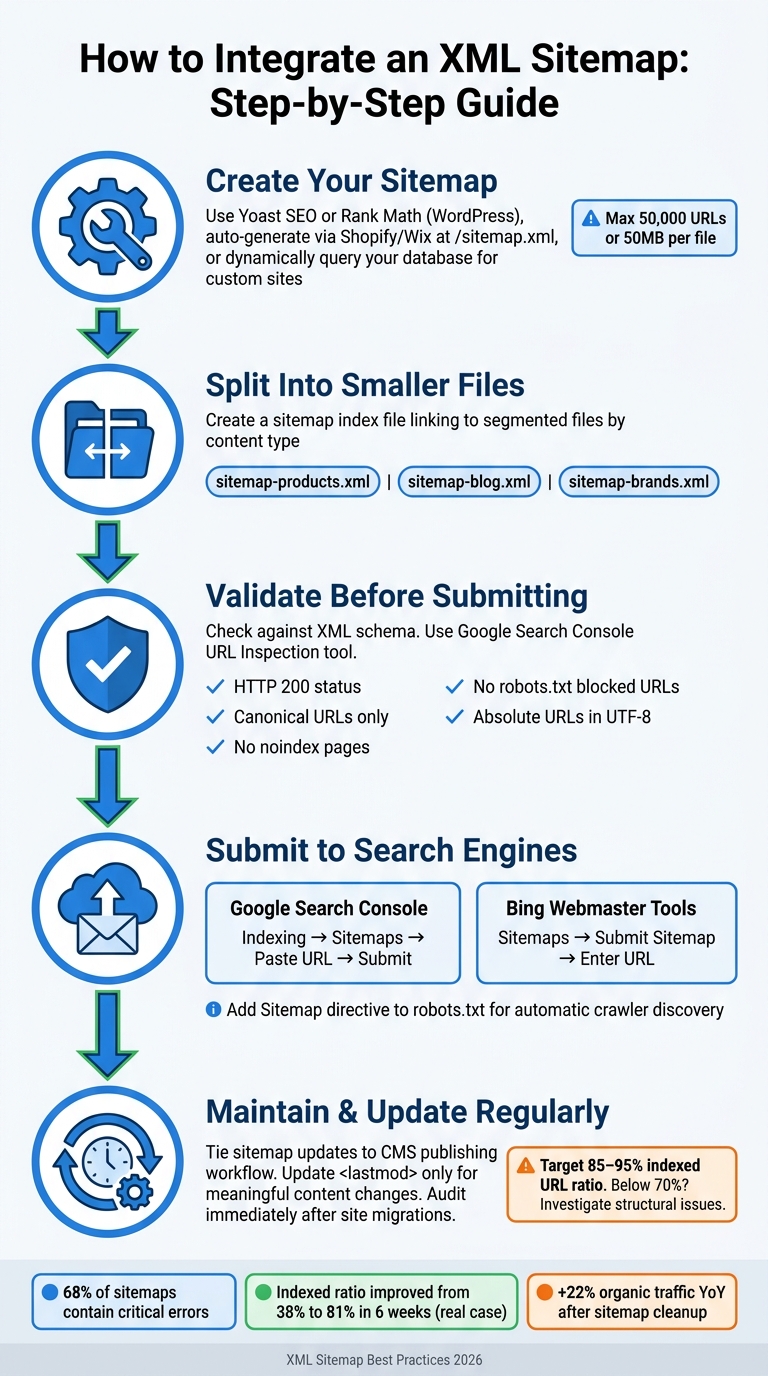
How to Integrate an XML Sitemap: Step-by-Step Guide
Creating and Validating Your Sitemap
Integrating an XML sitemap begins with creating and validating it correctly to ensure better crawl coverage.
To generate your sitemap, use tools tailored to your platform. For WordPress users, plugins like Yoast SEO or Rank Math can automatically create sitemaps. Platforms like Shopify and Wix also generate sitemaps automatically, typically available at /sitemap.xml. If your site is custom-built or has a large number of pages, you can dynamically generate sitemaps by querying your database for live, canonical URLs.
Keep in mind the technical limits: a single sitemap cannot exceed 50,000 URLs or 50MB when uncompressed [8]. If your site surpasses this limit, create a sitemap index file that links to multiple smaller sitemaps, organized by content type (e.g., sitemap-products.xml, sitemap-blog.xml). Ensure that all URLs in your sitemap are absolute (e.g., https://www.example.com/page), encoded in UTF-8, and use consistent protocols (don’t mix http with https or www with non-www).
Validation is crucial. Check your sitemap against XML schemas and use tools like Google Search Console’s URL Inspection to confirm that crawlers can access it. Avoid including URLs with noindex tags, redirects (301/302), or error codes (4xx), as these can confuse search engines.
"A strong sitemap is not a backup navigation menu. It is a controlled inventory of the URLs you actually want crawlers to discover, trust, and revisit." – Riley Donovan, Head of Technical SEO, Prerendering
Submitting Your Sitemap to Search Engines
Once validated, submit your sitemap to search engines:
- Google Search Console: Go to the Sitemaps section under Indexing, paste your sitemap URL, and click Submit.
- Bing Webmaster Tools: In the Sitemaps section, click "Submit sitemap" and enter the full URL. Bing typically checks submitted sitemaps daily for updates.
Additionally, add a Sitemap: directive to your robots.txt file (e.g., Sitemap: https://www.example.com/sitemap.xml) so that other crawlers can discover it automatically. Place the sitemap in your domain’s root directory to ensure it applies to all pages on your site.
Regularly updating your sitemap ensures it reflects any changes to your site.
Keeping Your Sitemap Current
An outdated sitemap can hurt crawl efficiency. Use the <lastmod> tag to indicate when a page was last updated, but only update it for meaningful content changes – minor edits shouldn’t trigger an update. Misleading timestamps can confuse search engines and reduce the sitemap’s effectiveness.
"A sitemap that includes every URL the database can produce – including draft pages, noindex pages, and redirected legacy URLs – actively misleads crawlers about what is worth indexing." – Sophia DuToit, Performance & Web Quality Engineer, CodeAva
Skip the <priority> and <changefreq> tags entirely. Google ignores these, and including them only adds unnecessary bulk to your sitemap. Instead, focus on maintaining an accurate URL list and honest <lastmod> dates. Tie sitemap updates to your CMS publishing workflow or inventory changes. After major site migrations or URL restructures, audit your sitemap immediately. Old paths from outdated architectures can silently waste your crawl budget.
Common XML Sitemap Mistakes to Avoid
XML sitemaps can be a powerful tool for improving SEO, but small errors in their implementation can undo much of their potential. Even with the best intentions, these mistakes can quietly harm your site’s crawl efficiency and search visibility over time.
Including Non-Indexable URLs
One of the most harmful missteps is adding URLs that search engines either can’t or shouldn’t index. This includes pages tagged with noindex, URLs blocked by robots.txt, pages that return 404 errors, or those caught in redirect loops (301/302). These mixed signals confuse search engines: your sitemap suggests the page is important, but the page itself says otherwise.
"A sitemap is a signal of intent: you are telling crawlers which URLs are worth their time. Including any low-quality, redirected, broken, or non-canonical URL dilutes your intended signal." – Sophia DuToit, Performance & Web Quality Engineer, CodeAva [12]
A detailed audit can help identify and remove non-indexable URLs. In fact, studies show that cleaning up sitemaps and segmenting them properly can significantly improve the ratio of indexed URLs and even boost organic traffic [2].
Before adding URLs to your sitemap, ensure they meet these criteria:
- Return an HTTP 200 status
- Are canonical versions of the URL
- Lack a
noindextag - Are not blocked by
robots.txt
By sticking to these guidelines, you ensure your sitemap remains clean and effective.
Outdated or Incomplete Sitemaps
A sitemap that doesn’t align with your live site can create just as many problems as not having one at all. If new pages aren’t added or deleted pages linger, search engines waste time crawling irrelevant URLs. A 2024 study revealed that 68% of sitemaps contain critical errors like stale dates or non-canonical URLs [13].
Automating your sitemap updates is the best solution. By linking sitemap generation to your CMS, you can ensure it reflects real-time changes – whether publishing new content or removing outdated pages. Static sitemaps, particularly on dynamic sites, are prone to falling out of sync over time, a problem known as "indexation drift" [12].
For a healthy sitemap, aim for 85–95% of its URLs to be indexed. If the ratio drops below 70%, it’s often a sign of deeper issues [4].
Misusing Priority Tags
It’s tempting to assign <priority>1.0</priority> to every page in your sitemap, but this approach is ineffective. Google openly ignores the <priority> field, so inflating these values serves no purpose other than bloating your sitemap file [12].
"Setting
<priority>1.0</priority>on every URL is like marking every email as ‘URGENT’; it diminishes the value of these tags." – Sophia DuToit, Performance & Web Quality Engineer, CodeAva [12]
The same logic applies to <changefreq>. While some non-Google crawlers may still consider these fields, they should be used sparingly and accurately. For instance:
- Assign the homepage a priority of 1.0
- Use 0.8 for category pages
- Set individual posts to 0.6 [6]
However, if you’re focused on Google, it’s better to skip these fields altogether and prioritize accurate <lastmod> values instead. A clean, straightforward sitemap with reliable metadata is far more effective.
Conclusion: XML Sitemaps as Part of Your Brand Growth Plan
An XML sitemap is more than just a technical file – it’s a powerful tool to ensure that your brand’s key pages are found and indexed by search engines. When properly managed, it helps maintain visibility for your most important content, even as crawl budgets tighten and the competition for search rankings heats up.
The benefits of maintaining a well-organized sitemap can be significant. For example, in a real estate SEO project, cleaning up unnecessary URLs and refining the sitemap structure boosted the Day 2 index rate from 85% to 90%. While this 5% improvement might seem small, it translated into 19 additional pages being indexed daily, resulting in over 120,000 extra organic visitors annually [10]. This demonstrates how optimizing your sitemap can directly contribute to measurable growth.
"In 2026, with Google processing billions of pages daily and crawl budgets tighter than ever, a poorly structured sitemap isn’t just a missed opportunity – it’s a liability." – Guy Sheetrit, Author, Over The Top SEO [6]
A well-optimized sitemap doesn’t just improve traffic – it supports your broader brand goals. It ensures that your most valuable pages – like product pages, landing pages, and cornerstone content – are consistently visible. Plus, it helps identify indexing issues across your site, preventing minor problems from escalating into larger ones.
"Clean technical SEO gets you discovered. Strong links get you ranked." – Vlad Orlov, Brand Partnerships, Respona [11]
As AI crawlers like OpenAI’s GPTBot and Anthropic’s ClaudeBot become more integral to search and content discovery, the role of a clean and accurate sitemap grows even more critical [2]. For brands focused on long-term digital growth, getting this right is an investment in staying visible and competitive in an evolving online landscape.
FAQs
Which pages should I include in my XML sitemap?
Your XML sitemap should list only canonical and publicly accessible URLs that return a 200 HTTP status code. Prioritize critical pages such as your homepage, essential services, flagship blog posts, and key products. Avoid including pages with noindex tags, redirects, error codes (4xx/5xx), admin or login pages, or duplicate content. A well-maintained sitemap helps search engines index your site effectively, aligning with the growth-focused approach of ChrisRubinCreativ (CRC).
How often should I update my sitemap and the <lastmod> dates?
Whenever you publish new content, make sure your sitemap gets updated – automating this process is the best approach. However, be cautious with the <lastmod> tag. Only update it when the content on a page has actually undergone significant changes.
If you update timestamps for pages that haven’t been altered, search engines might view your sitemap as unreliable. This could lead to search engines ignoring it altogether.
Stick to the W3C Datetime format (YYYY-MM-DD) to indicate the real date of modification. Avoid using the sitemap’s generation date, as this doesn’t reflect actual content updates. Accuracy here is key.
What does a low indexed-URL percentage mean, and how do I fix it?
A low percentage of indexed URLs means that many of your submitted pages aren’t showing up in search results. This often happens because of quality problems, technical issues, or how Google prioritizes crawling. To pinpoint the cause, check Google Search Console for exclusion reasons like crawl errors or noindex tags.
To improve indexing, make sure your XML sitemap only lists high-quality, canonical URLs. Strengthen your internal linking structure, enhance server performance, and address problems like soft 404 errors or redirect chains. These steps can help ensure more of your pages get indexed.